In this article ▾
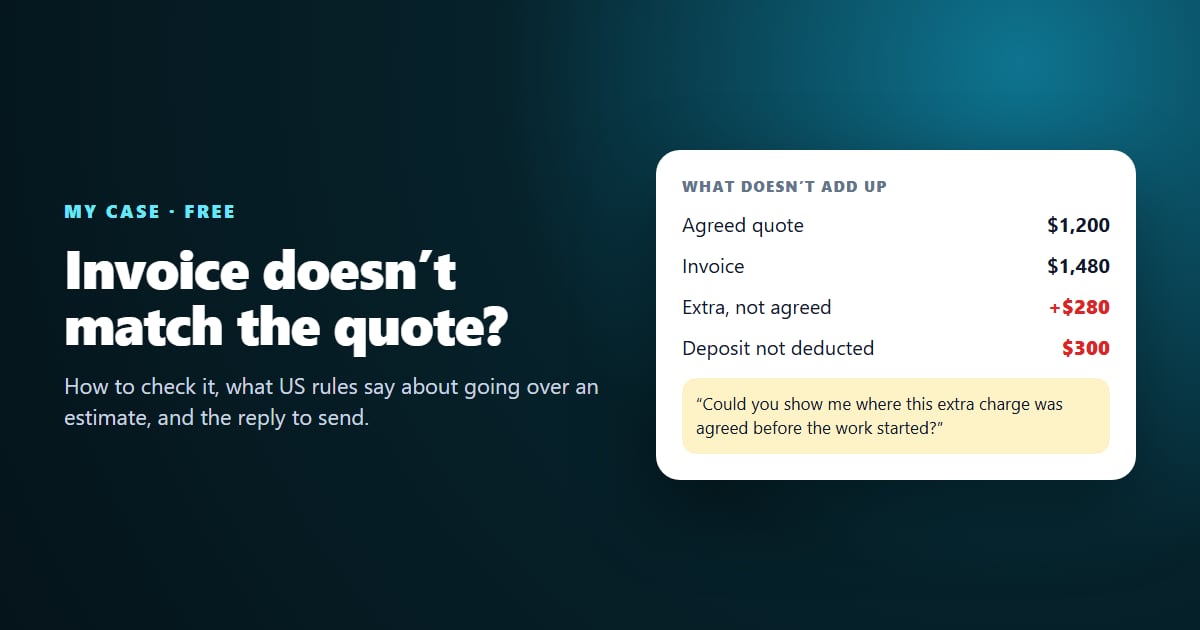
Quick answer: When an invoice doesn’t match the quote, compare four things: the total, every line item, any payment you already made and the dates. Then ask — in writing, politely — where the difference was agreed. Several US rules back you up. In California, an auto shop can’t charge more than its written estimate without your consent. In Florida, the allowance is the greater of $10 or 10%, capped at $50. On an interstate move with a non-binding estimate, the mover can demand no more than 110% at delivery. BrieflyGo My Case does the comparison for you, for free. Drop the quote, invoices, receipts and messages. It shows each mismatch with the exact line it came from and writes the reply.
Last verified: 23 October 2026, against the FTC, the Federal Motor Carrier Safety Administration and the eCFR, the California Contractors State License Board and California Legislative Information, and the Florida Statutes. This article is educational and is not legal advice. For a dispute with real money at stake, talk to a lawyer or your state or local consumer protection office.
Why the final bill drifts from the quote
Most of the time, nobody is trying to cheat anyone. A job turns out bigger than it looked. A change gets agreed on the phone and never written down. A deposit is paid by bank transfer and the bookkeeper invoices the full amount anyway. A second version of the quote quietly replaces the first. The trouble is that the paperwork lands in different places: the quote as a PDF in email, the deposit receipt in your banking app, the “by the way, that’ll be $280 more” in a text message. By the time the final invoice arrives, nobody has the whole picture in one place.
Federal complaint data shows how common billing problems with services are. In 2024 the FTC’s Consumer Sentinel Network logged 197,015 reports in its “Auto Related” category, up from 179,231 in 2022. It logged 81,925 in “Home Improvement, Repair, and Solar”. Of the network’s 29 categories, those ranked 7th and 16th.
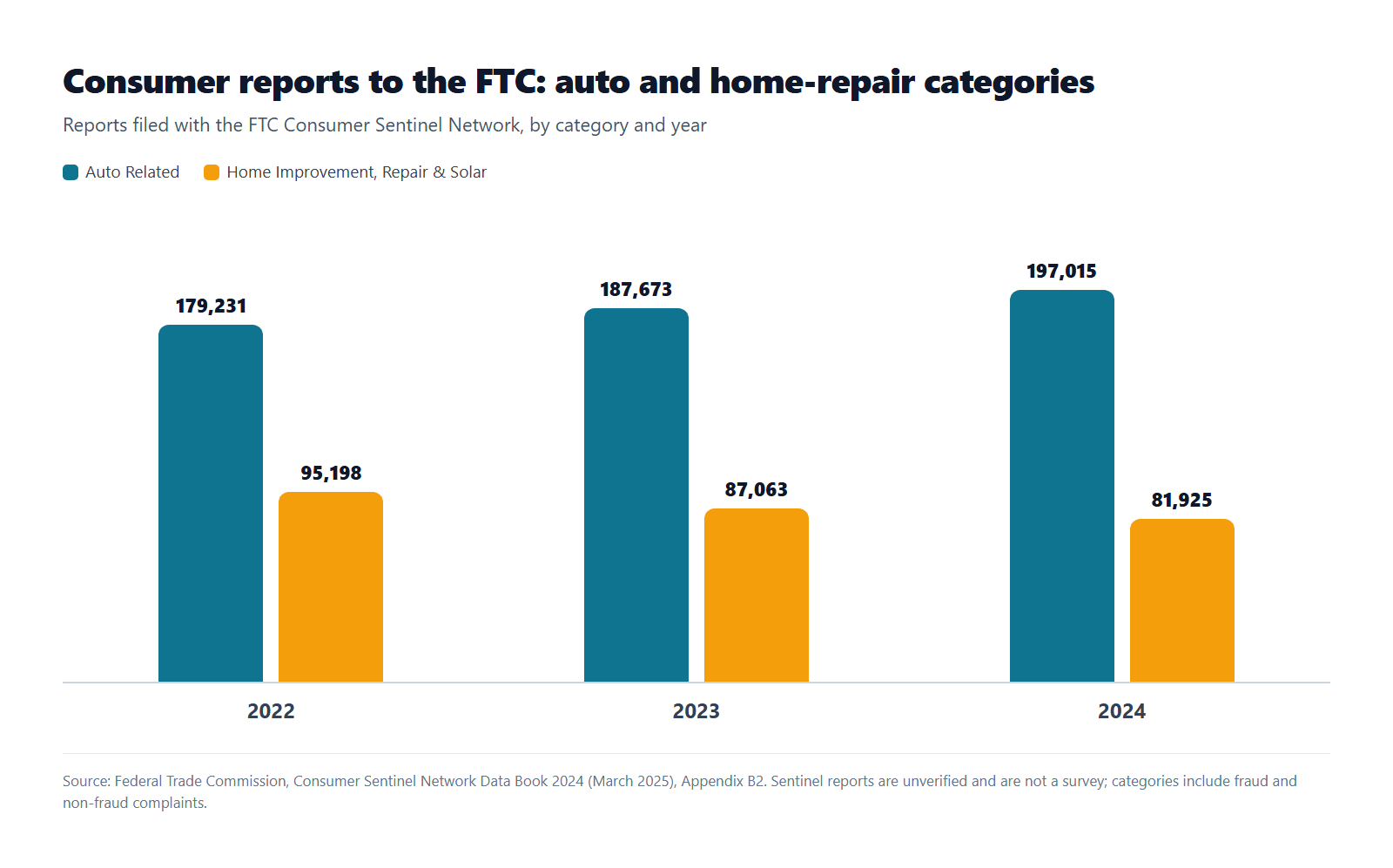
Those numbers aren’t a count of overcharged invoices. They are complaints of every kind, and the FTC is explicit that Sentinel data is unverified. But they show that disputes over cars and homes are a steady, everyday problem. Most such disputes never reach a regulator, because they are settled — or lost — in an email thread.
What US rules say about charging more than the estimate
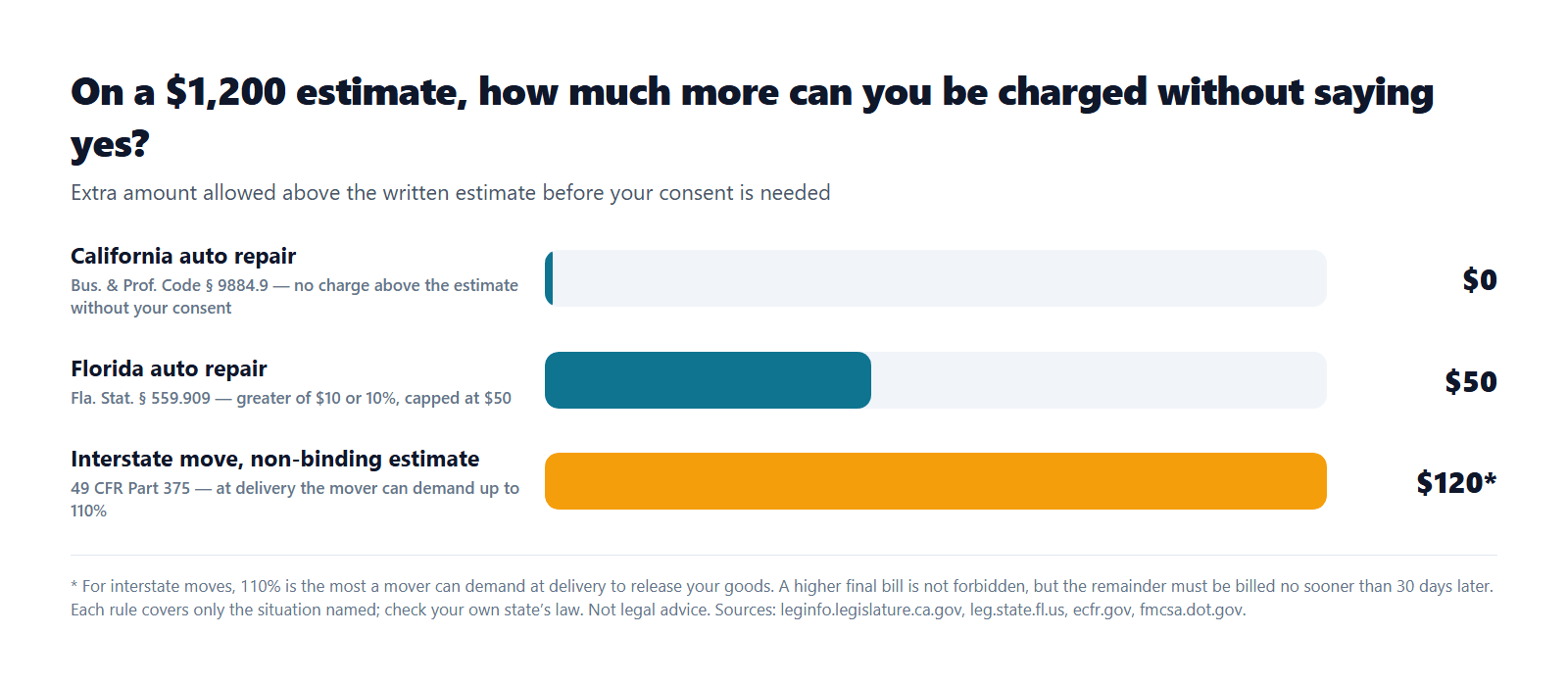
There is no single national rule for estimates. It depends on the industry and the state. These are some of the clearest examples:
| Situation | Rule | What it means for you |
|---|---|---|
| Auto repair in California | Bus. & Prof. Code § 9884.9 | No charge for work or parts above the estimated price without your oral or written consent, given before the extra work is done. |
| Auto repair in Florida | Fla. Stat. § 559.909 | The shop must notify you if charges will exceed the written estimate by more than $10 or 10%, whichever is greater (capped at $50). It is unlawful to charge more than that without your authorization. |
| Interstate move, non-binding estimate | 49 CFR Part 375 (FMCSA) | The mover can’t require more than 110% of the estimate at delivery. If the bill is higher, it must release your goods once you pay 110% and defer the rest for at least 30 days. |
| Home improvement in California | Bus. & Prof. Code § 7159.5 (CSLB) | The down payment can’t exceed $1,000 or 10% of the contract price, whichever is less. Contractors can’t collect for work not yet done or materials not yet delivered. |
| Paid by credit card, anywhere in the US | Fair Credit Billing Act (FTC guidance) | A charge with the wrong amount, or for something not delivered as agreed, is a billing error you can dispute in writing within 60 days of the first statement that showed it. |
For home improvement, the FTC’s advice is simple. Get a written contract that lists the contractor’s name, address, phone and license number, the start and completion dates, the cost of labor and materials, and any promises made in conversation about the scope of work. “Don’t pay the full amount for the project up front,” and “never make the final payment until the work is done and you’re satisfied with it.” The FTC also notes that some states limit how large a down payment a contractor can ask for. California is one of them.
The pattern behind all of these rules: the written estimate is the reference point, and a change in price is supposed to be agreed before the work, not discovered on the invoice. That is exactly the question My Case asks for you: where was this agreed?
How to check an invoice against the quote by hand
You can do this yourself with the documents side by side. Work through these four checks in order:
- Total. Is the invoice total the agreed price plus only the changes you approved? If not, the difference needs an explanation.
- Line items. Does every line on the invoice appear in the quote? A new line, such as “additional pipework” or “disposal fee”, is an extra charge. Ask when it was agreed. Also check that the lines add up to the total. Missing tax and simple typos are common.
- Payments already made. Find every deposit, instalment and credit note. Each one should be subtracted from what you still owe. A deposit that isn’t deducted is one of the most common invoice mistakes.
- Dates. Compare the completion date and due date with the agreement. A moved date matters when payment terms or late fees depend on it.
If you have two versions of the quote with different totals, settle which one counts before arguing about anything else.
Meet My Case: the whole deal in one place
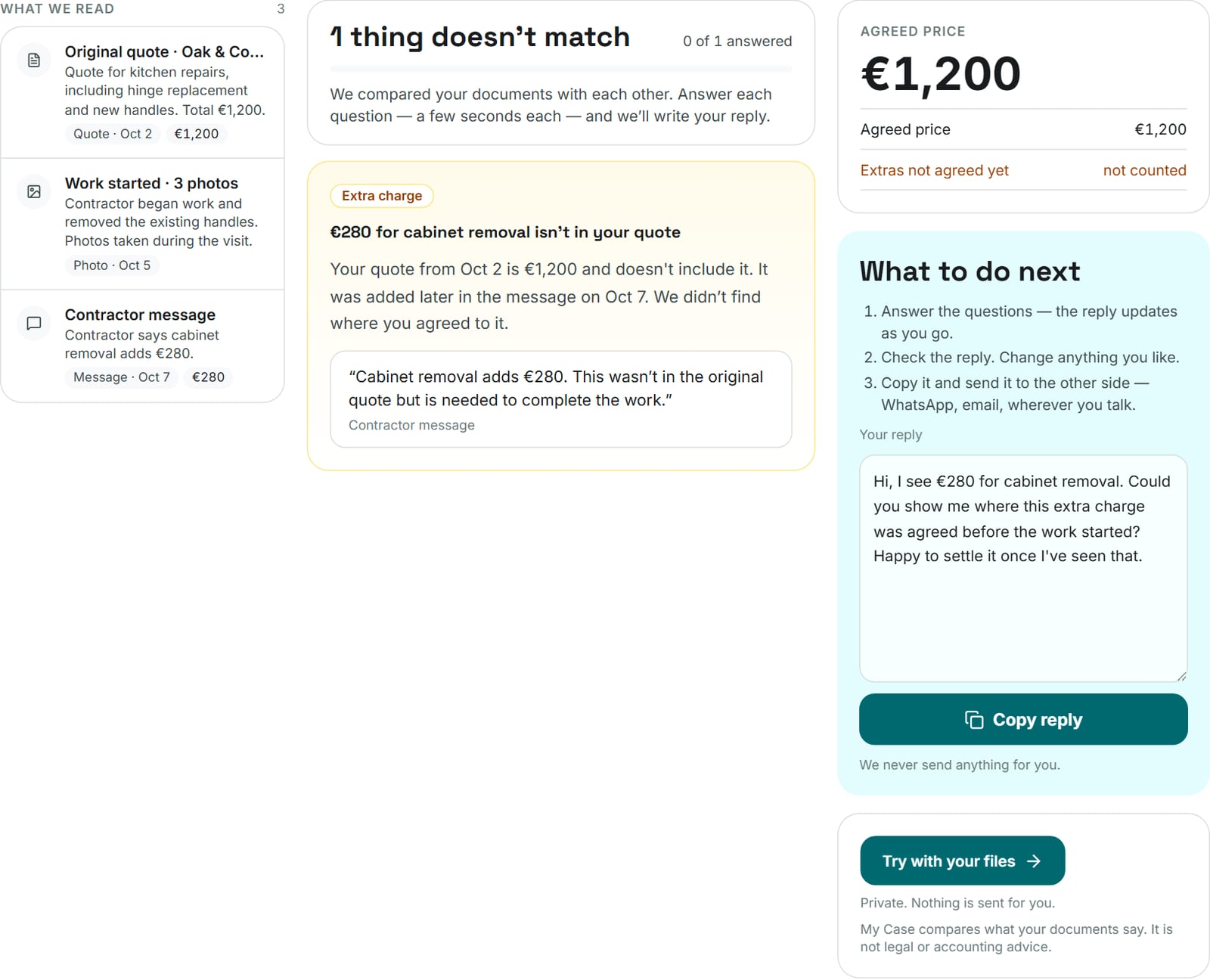
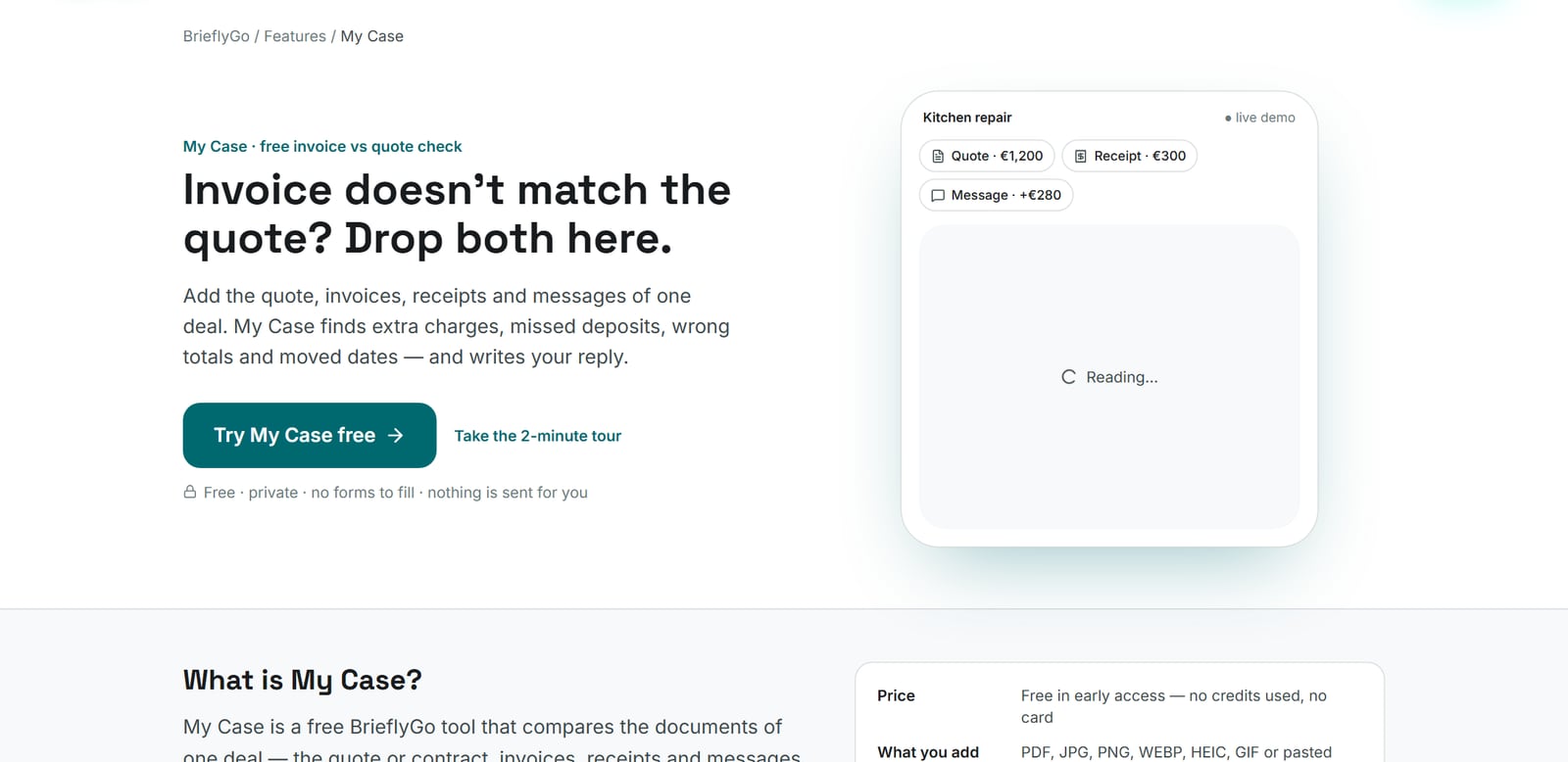
My Case is a free BrieflyGo feature for what happens after you agree a price. One case holds one deal: a repair, a renovation, a move, a project. You drop in everything you have about it. My Case reads each document, puts it on a timeline and checks the documents against each other. You don’t fill in any forms.
How it works
- Drop the documents of one deal. That means the quote or contract, every invoice, receipts, screenshots of messages and photos of paper. PDF, JPG, PNG, WEBP, HEIC and GIF files up to 15 MB each, and pasted text from email or chat. The case is created and named for you.
- See what doesn’t add up. Anything off becomes a short question with the exact words from both sides. You get one or two questions at most, each with a one-tap answer.
- Copy one reply. One polite message covers every open point, with the numbers from your documents. Edit it, then paste it into email, WhatsApp or the contractor’s portal. Nothing is ever sent for you.
The eight checks it runs every time you add a document
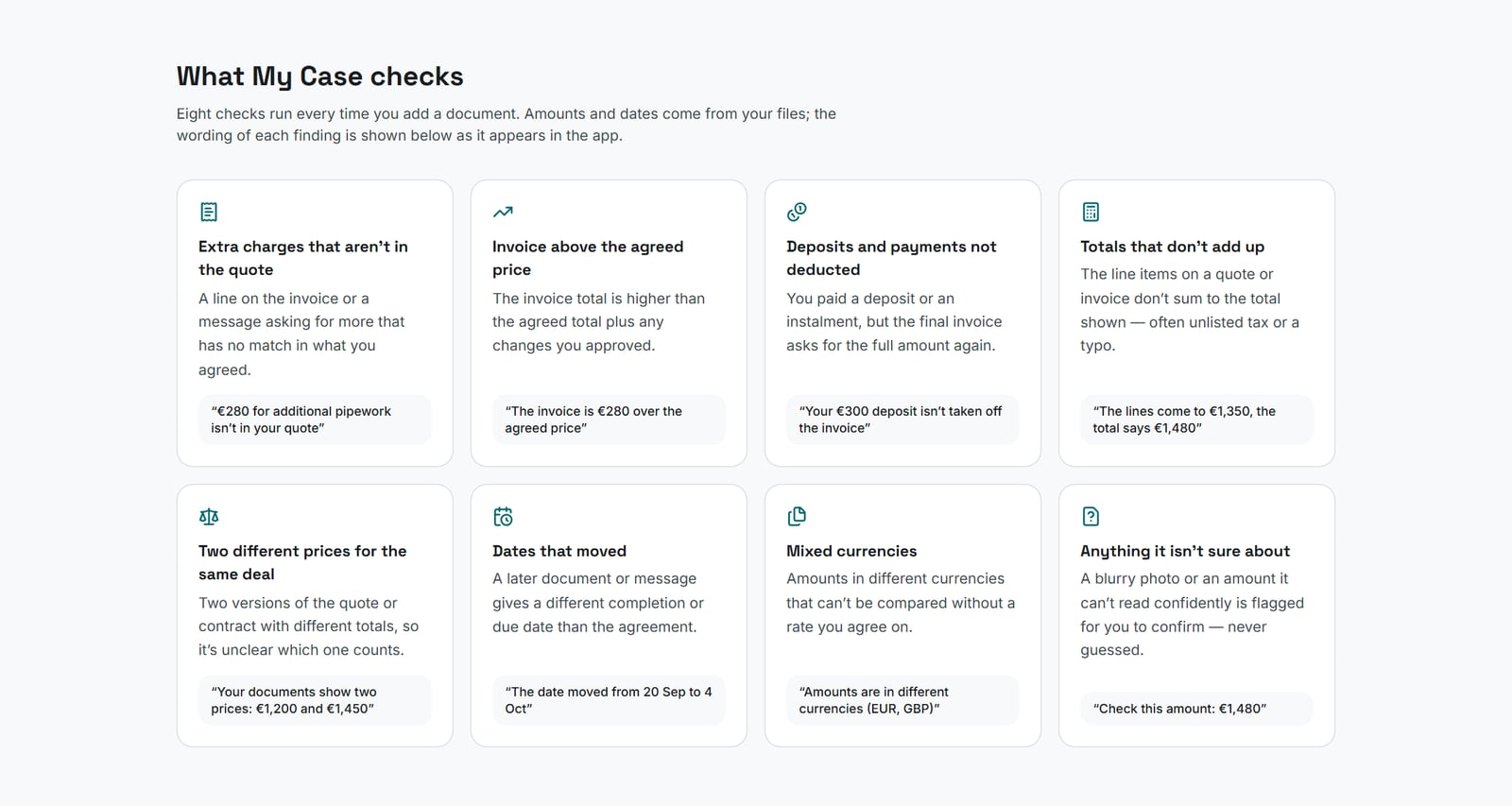
- Extra charges that aren’t in the quote. A new line or a message asking for more that has no match in what you agreed.
- Invoice above the agreed price. The total is higher than the agreed price plus the changes you approved.
- Deposits and payments not deducted. You paid something and the invoice asks for the full amount again.
- Totals that don’t add up. The lines don’t sum to the total shown.
- Two different prices for the same deal. Two versions of the quote or contract disagree.
- Dates that moved. A later document gives a different completion or due date.
- Mixed currencies. Amounts can’t be compared without an agreed rate.
- Anything it isn’t sure about. A blurry photo or an unclear amount is flagged for you to confirm. My Case doesn’t guess.
The reply it writes
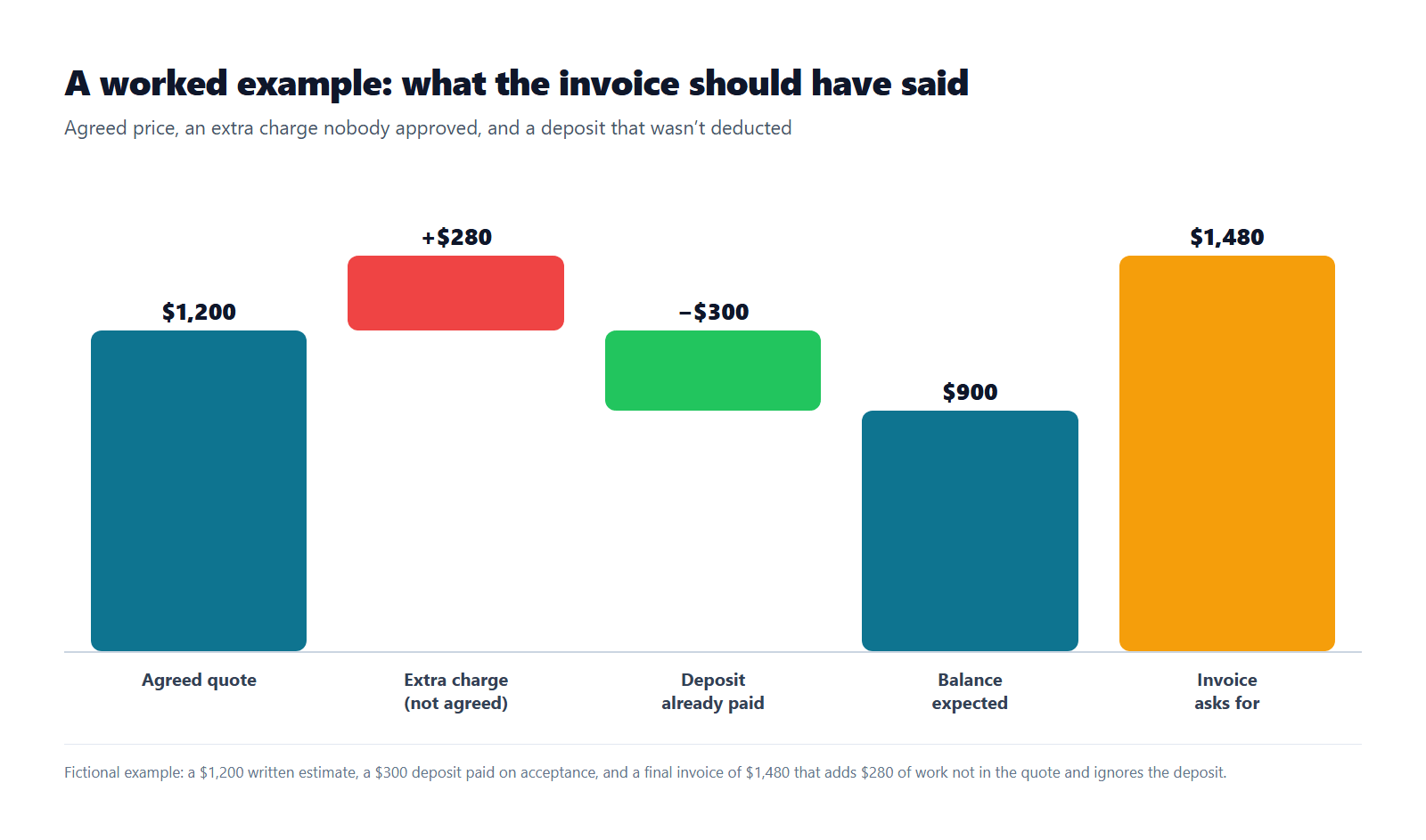
The reply follows the same principle as the rules above: ask, don’t accuse. A change may really have been agreed on the phone. So the message names the amount, says what you expected and asks where it was agreed. For the worked example above, it reads:
Hi, thanks for sending this over. A couple of things I’d like to check:
1. I see $280 for additional pipework. Could you show me where this extra charge was agreed before the work started? Happy to settle it once I’ve seen that.
2. I already paid $300 (deposit). Could you confirm whether that payment has been applied to this invoice? By my count the remaining balance would be $900.
Thanks!
The numbers in the reply come from your documents and the checks, never from an AI guess. You can change any word before you send it.
Why use My Case instead of a spreadsheet
| My Case | By hand | |
|---|---|---|
| Reads PDFs, photos and message screenshots | Yes | You retype the numbers |
| Checks every document against every other | Yes | Easy to miss one |
| Quotes the exact line behind each finding | Yes | Only if you copy it |
| Remembers deposits and part payments | Yes | Only if you track them |
| Writes a calm reply with the numbers | Yes | You write it yourself |
| Keeps the deal on one timeline | Yes | Spread over email and chats |
| Cost | Free | Your evening |
- It’s free. My Case is free in early access, uses no credits and needs no card. You need a free account so your case is saved and private.
- It asks questions instead of handing down verdicts. A different amount isn’t always a mistake, so you get a question and a one-tap answer. That keeps the relationship with the other side intact.
- Every finding shows its evidence. You see the quote line and the invoice line side by side, so you can check the finding yourself.
- It stays private. Files are stored in your case exactly as you uploaded them, never shared, and deleted with the case.
- It has room for a whole deal. A case holds up to 30 documents, and you can keep up to 20 active cases.
If the reply doesn’t settle it
Most mismatches end with a corrected invoice or a short explanation. If yours doesn’t:
- Paid by credit card? Under the Fair Credit Billing Act, a charge with the wrong amount or for something not delivered as agreed is a billing error. Write to your card issuer’s address for billing inquiries, not the payments address. Your letter must reach the issuer within 60 days after the first bill with the error was sent to you. The issuer must acknowledge it within 30 days and resolve it within 90. Your My Case timeline and quotes are the supporting documents to attach, as copies.
- A licensed trade? In many states, contractors, auto repair shops and movers have a licensing or regulatory body that takes complaints. In California that is the CSLB for contractors and the Bureau of Automotive Repair for auto shops. For interstate moves it is the FMCSA. Use “Download all” in My Case to keep the evidence in one file.
- Still stuck? Contact your state attorney general or local consumer protection office, or talk to a lawyer, especially before paying a large disputed amount or ignoring a lien threat. See lien in our glossary for what that means.
Other BrieflyGo tools for the same job
My Case covers the part after you agree. These cover the rest of the same deal:
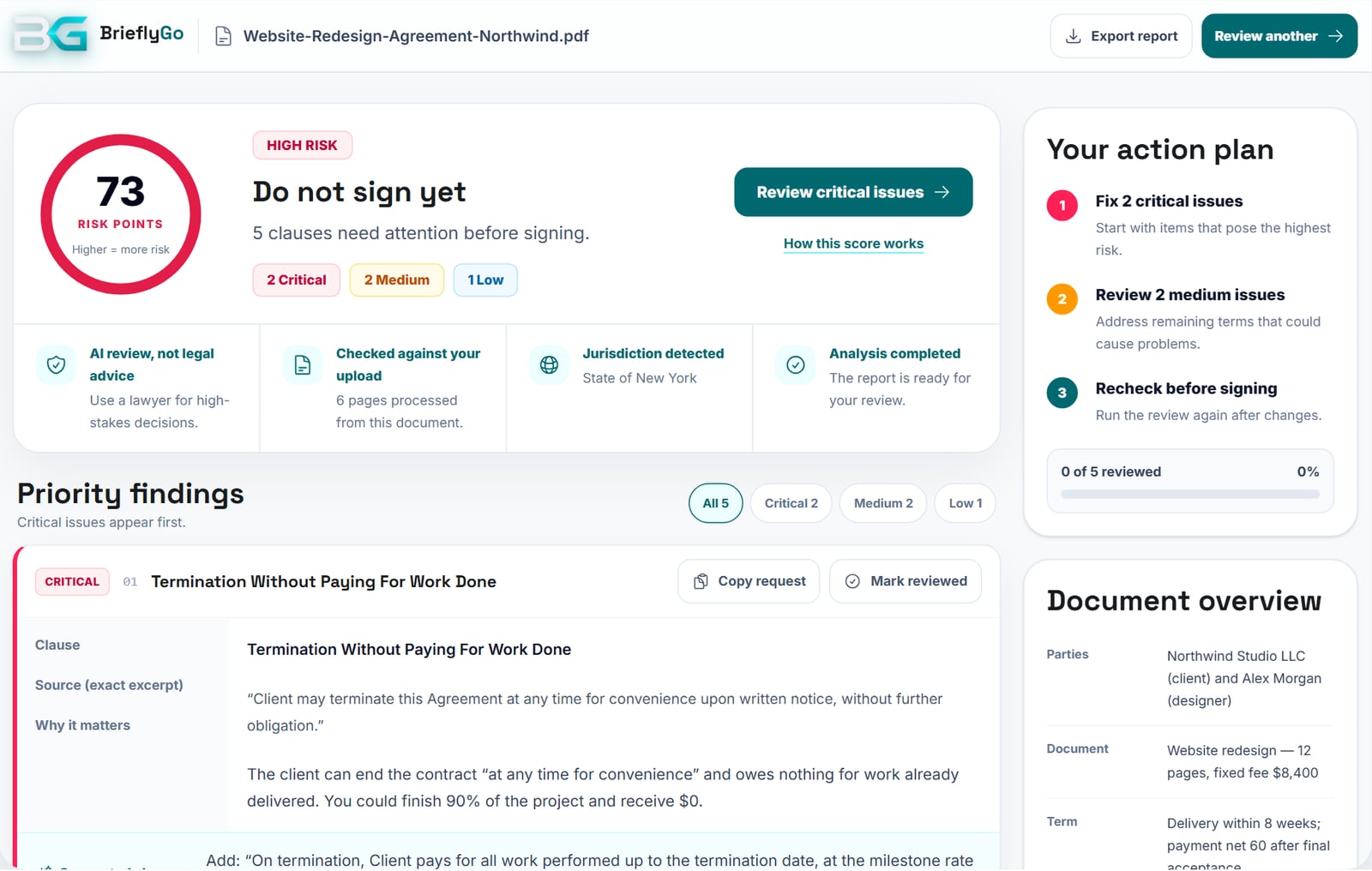
- Before you sign: the contract risk report. Upload the contract or quote and see, in plain English, the clauses that could cost you, such as open-ended “reasonable extra charges”, payment that depends on acceptance with no deadline, or a client who can cancel without paying for work done. Each finding comes with a suggested change you can copy as a request.
- Fix it before it’s signed: the AI editor. Change the real text of the agreement, add a clear change-order or late-payment clause, sign, and re-check the edited version. Try it with a sample agreement in the editor tour.
- Doing the work yourself? Make your own paperwork unambiguous. Use the free quote generator and estimate generator to put scope, price and validity in writing. Then use the invoice generator to bill against them, and send the receipt generator’s receipt for every deposit. Most of the mismatches My Case finds can’t happen when this paperwork is clear.
- Getting paid late? The invoice reminder email generator writes a firm, polite follow-up.
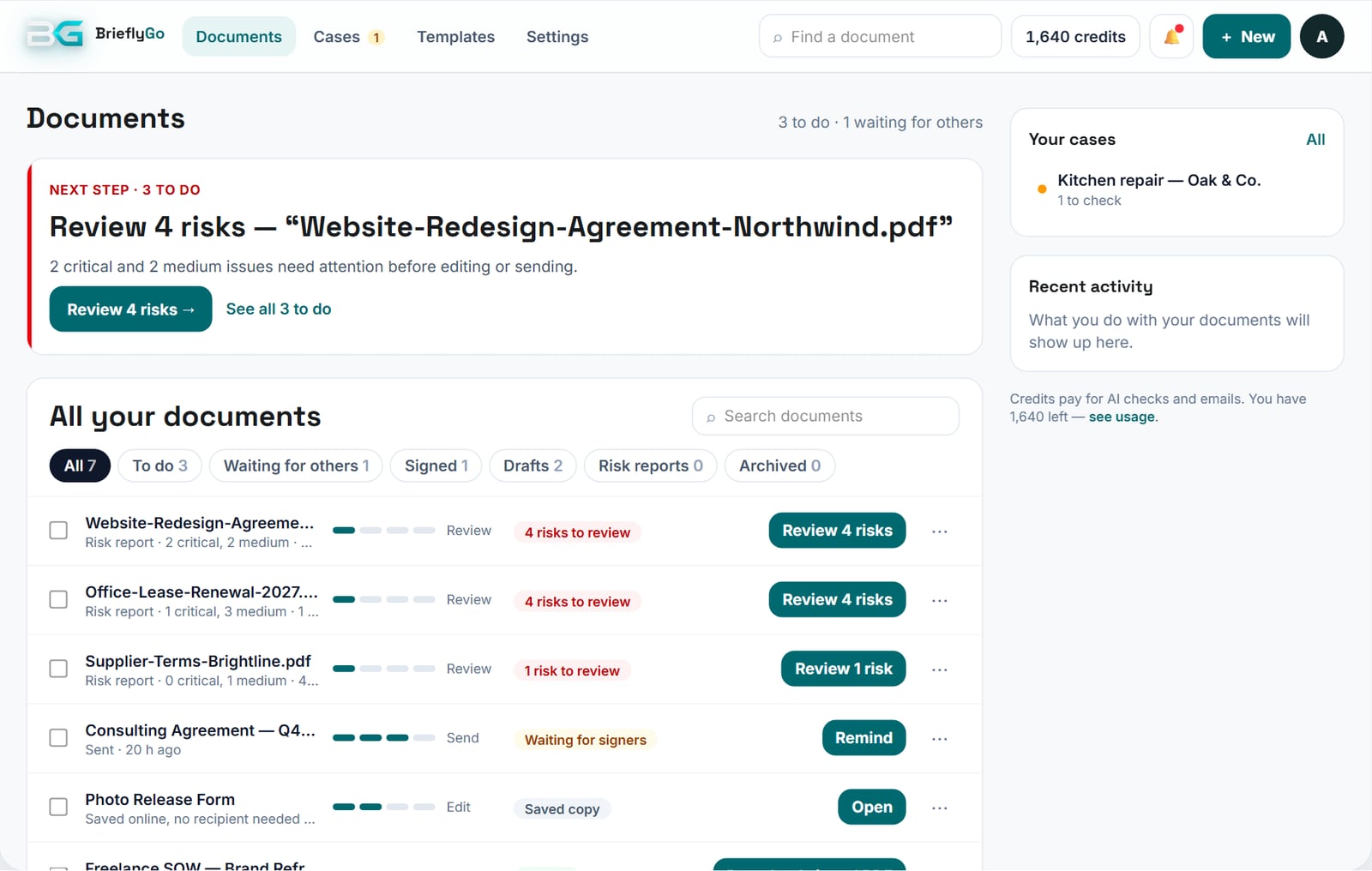
- Keep everything in one place: the dashboard. Reports, drafts, documents out for signature, signed copies and your My Case cases sit in one list, each showing its stage. See it with a sample account in the dashboard tour.
What the Solo plan adds (and what stays free)
My Case stays free on every plan, including the free one. You don’t need a subscription to check an invoice against a quote. The Solo plan is for people who deal with agreements regularly — freelancers, contractors, tenants, small business owners — and want to get the paperwork right before the invoice stage.
| Free Starter | Solo — $19/month | |
|---|---|---|
| My Case | Free | Free |
| Contract risk reports per month | 3 | 15 |
| Monthly credits (AI checks, chat, OCR, emails) | 300 | 2,000 |
| Unused credits roll over | No | Up to 4,000 |
| Saved templates | 1 | 3 |
| Signer reminders | 1 | 5 |
| Proof Vault for signed documents | — | Included |
Solo also includes the full Soft Editor with AI Re-check after edits and PDF export, plus protected signer links for sending documents to sign.
In practice, Solo gives you room to review every contract and quote you sign in a month. Fix the clauses that cause invoice fights — scope, change orders, deposits, payment terms — in the editor, re-check them, and send the clean version for signature with a protected link. When the invoices arrive, My Case is still free. Compare all plans on the pricing page.
FAQ
Is it legal for a contractor to charge more than the quote?
It depends on your state, the industry and what your contract says about changes. Some rules are strict: California auto shops can’t exceed a written estimate without your consent. Others allow a margin, like Florida’s $10-or-10% rule for auto repair, capped at $50. Many home improvement contracts allow price changes only through a written change order. If an extra charge wasn’t agreed, ask where it was agreed before you pay it.
My deposit isn’t on the final invoice. What should I do?
Ask the other side to confirm that your deposit has been applied and to send the remaining balance. Attach the receipt or bank record. If you add that record to My Case, it spots that the deposit isn’t deducted and works out the balance it expected.
Does My Case decide who is right?
No. It compares what your documents say and shows where they disagree, with the exact words. A difference might have been agreed somewhere you didn’t add, so you answer a question rather than receive a verdict. My Case is not legal or accounting advice.
What files can I add to My Case?
PDF, JPG, PNG, WEBP, HEIC and GIF files up to 15 MB each, plus pasted text from email or chat. A case holds up to 30 documents.
Does My Case send anything to the contractor?
No. You copy the reply and send it yourself, wherever you usually talk to them.
Do I need a paid plan to use My Case?
No. My Case is free in early access on every plan and uses no credits. You need a free account so your case is saved privately.
Sources
- Federal Trade Commission — Consumer Sentinel Network Data Book 2024 (March 2025): report categories (p. 7) and Appendix B2, report categories over three years.
- Federal Trade Commission — How To Avoid a Home Improvement Scam.
- Federal Trade Commission — Using Credit Cards and Disputing Charges (Fair Credit Billing Act).
- FMCSA — Estimating Charges (Subpart D), and eCFR — 49 CFR 375.407.
- California Legislative Information — Business and Professions Code § 9884.9 (automotive repair estimates).
- California Contractors State License Board — Home Improvement Contracts (down payment limit, B&P Code § 7159.5).
- The Florida Legislature — Florida Statutes § 559.909 (motor vehicle repair estimates).