Payment terms
When you get paid, what payment depends on, late-payment terms and anything that lets the other side delay or reduce it.
Example finding: “Payment depends on open-ended acceptance”
Risk Report · AI contract risk scan
Upload the contract. In about a minute you see a risk score, the clauses that could cost you money or rights — quoted word for word — and the change to ask for.
Free to start · PDF, DOCX or TXT · not used to train AI
Upload
Upload a PDF, DOCX, or TXT to generate a risk report.
Drag and drop or click to upload
PDF, DOCX or TXT · up to 20 MB
Analysis starts automatically after upload
A BrieflyGo contract risk report is a plain-English review of one contract. You upload a PDF, DOCX or TXT file and, usually in under a minute, get a 0–100 risk score, every risky clause sorted into critical, medium and low, the exact wording each finding comes from, why it matters to you and a suggested change you can copy as a polite request to the other side. It is built for freelancers and small businesses who sign contracts without a lawyer on call. It explains the document; it is not legal advice.
Three steps, a few minutes. You only need the file you were sent.
Drop the PDF, Word file or text you were sent. The document type is detected for you — freelance agreement, SOW, NDA, lease, offer letter and more.
Start with the score and the critical findings. Each one quotes the clause, explains the risk in plain English and suggests a fairer wording.
Copy the ready-made request into your email, or fix the clause in the editor and run the review again on the new version before you sign.
Real product · sample contract
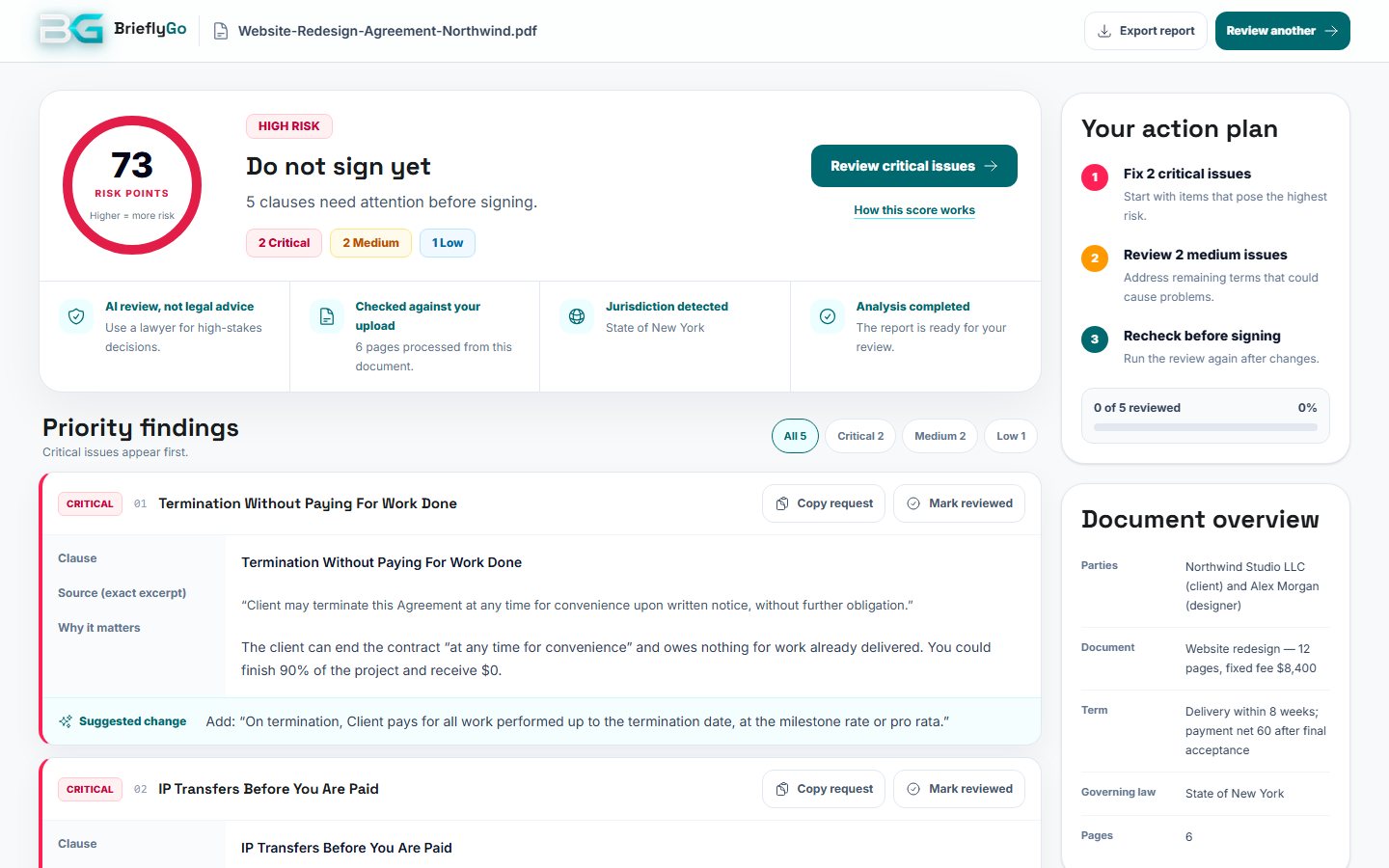
These are screenshots of the actual report screen. The contract is fictional: a $8,400 website redesign where the client can cancel without paying and owns the work before paying for it.
A 0–100 risk score, the number of critical, medium and low findings, and one line on whether to sign as is.
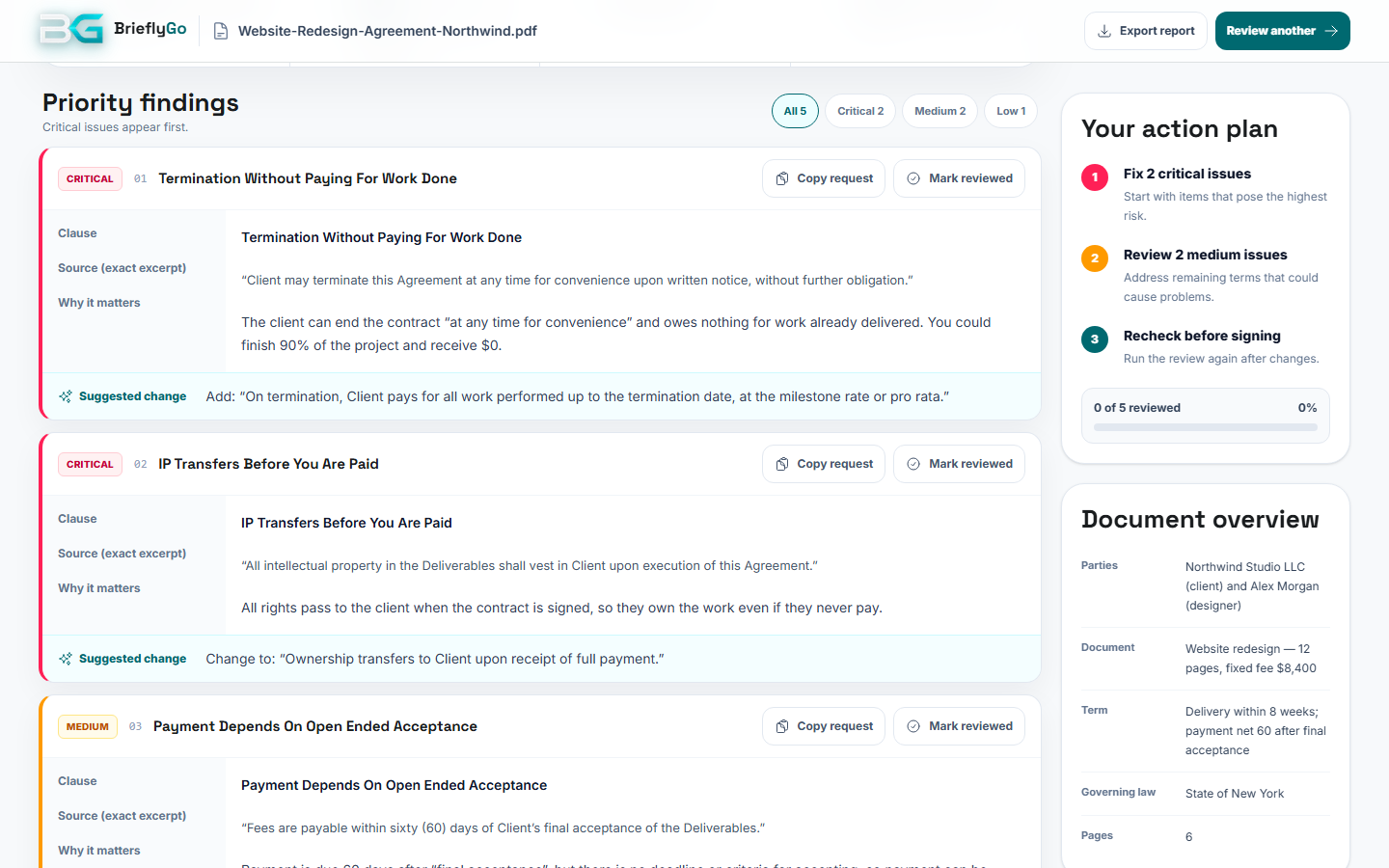
The exact clause, why it matters in plain English, and a suggested change you can copy as a request.
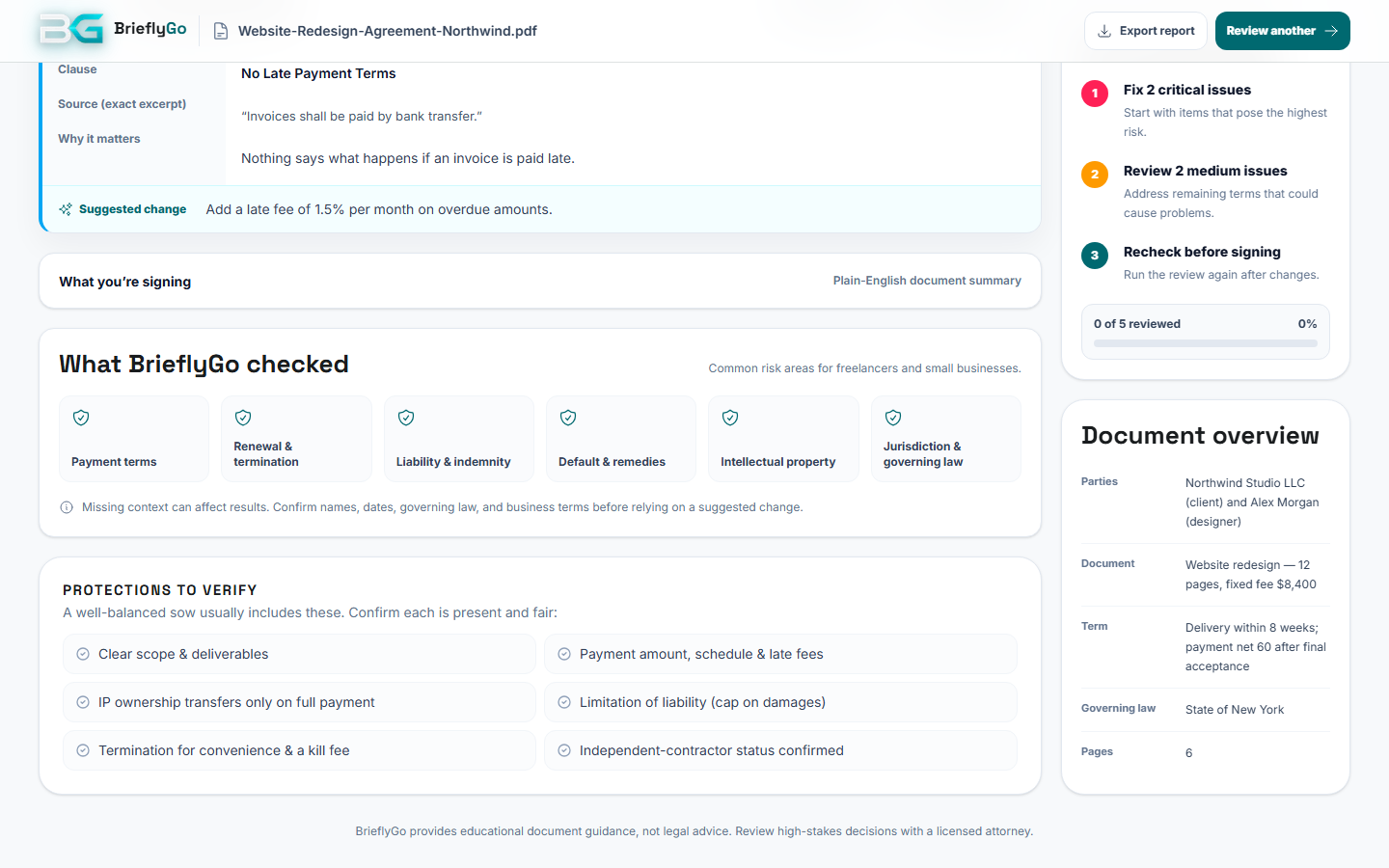
The six risk areas reviewed, and an action plan that ends with a re-check of the edited contract.
Six areas where contracts most often cost freelancers and small businesses money. The report shows which ones it looked at, so you know what is fine as well as what isn’t.
When you get paid, what payment depends on, late-payment terms and anything that lets the other side delay or reduce it.
Example finding: “Payment depends on open-ended acceptance”
Who can end the contract, with how much notice, what is owed on the way out and whether it renews on its own.
Example finding: “Termination without paying for work done”
Uncapped liability, one-sided indemnities and promises that make you pay for losses you don’t control.
Example finding: “You indemnify the client for any claim, with no cap”
What counts as a breach, whether you get a chance to fix it, and penalties that are out of proportion.
Example finding: “No cure period before termination for breach”
When ownership of your work transfers, what you keep, and whether you can show it in your portfolio.
Example finding: “IP transfers before you are paid”
Which law applies and where disputes are heard — or the fact that the contract doesn’t say.
Example finding: “Governing law: not specified”
Every finding has the same four parts: the clause as it is written, why it matters to you, a fairer wording, and a request you can send. You don’t need to know legal language to use it — or to ask for the change.
Find the findings in your contractClause
Client may terminate this Agreement at any time for convenience upon written notice, without further obligation.
Why it matters
The client can end the contract “at any time for convenience” and owes nothing for work already delivered. You could finish 90% of the project and receive $0.
Suggested change
Add: “On termination, Client pays for all work performed up to the termination date, at the milestone rate or pro rata.”
Copy request
Regarding the "Termination without paying for work done" clause: Add: “On termination, Client pays for all work performed up to the termination date, at the milestone rate or pro rata.” Could we amend the agreement accordingly before I sign?
The risk score runs from 0 to 100; higher means more risk. Each critical finding adds 25 points, each medium finding 10 and each low finding 3, and the total is capped at 100. The score is a quick way to compare contracts — the findings themselves tell you what to do.
| Score | Level | What the report tells you |
|---|---|---|
| 0–34 | Moderate risk | Review before signing. Low risk if there are no critical or medium findings at all. |
| 35–59 | Elevated risk | Negotiate before signing. Some clauses may put you at a disadvantage. |
| 60–100 | High risk | Do not sign yet. Fix the critical items first, then re-check. |
Points per finding: critical 25, medium 10, low 3. Capped at 100.
Most contracts aren’t dangerous because of what they say in big print. They’re dangerous because of one sentence about when payment is due, who can cancel, or when the work stops being yours — and most people never read that sentence closely.
The cost shows up later, as invoices paid in 90 days instead of 15, a cancelled project with nothing to show for it, or a renewal you didn’t notice. For businesses, research by World Commerce & Contracting puts the average loss at 8.6% of a contract’s expected value.
Source: World Commerce & Contracting with Deloitte, “The ROI of Contracting Excellence”, 2023.
A risk report doesn’t make you a lawyer. It makes sure you read the sentences that matter — before your signature does.
Share of respondents, %. Each bar is from a separate survey — see the source under it.
The document type is detected automatically, and the checklist adapts to it.
They’re not rivals. The report is the fast first pass; a lawyer is for when the stakes are high.
| Task | BrieflyGo report | On your own | Lawyer review |
|---|---|---|---|
| Time to a first answer | About a minute | An evening | Days |
| Cost | Free to start | Free | Hourly or fixed fee |
| Finds one-sided clauses | If you know what to look for | ||
| Quotes the exact wording | |||
| Suggests a fairer clause | |||
| Ready-to-send request to the other side | Sometimes | ||
| Re-checks the edited version | Billed again | ||
| Legal advice for your situation |
Knowing the limits is how you use it well.
It is a plain-English review of one contract that lists the clauses that could cost you money, rights or time, sorted by severity. Each finding quotes the exact wording, explains why it matters and suggests a change. BrieflyGo adds a 0–100 risk score, a short summary of the deal and an action plan.
Look at six areas first: when and how you get paid, how either side can end the contract, liability and indemnity, what happens on a breach, who owns the work and when, and which law applies. Upload the contract to BrieflyGo and the report checks all six for you, quoting each clause it flags.
Each critical finding adds 25 points, each medium finding 10 and each low finding 3, capped at 100. Below 35 means review before signing, 35–59 means negotiate before signing and 60 or more means don’t sign yet. The sample agreement on this page has two critical, two medium and one low finding: 50 + 20 + 3 = 73.
Yes, you can start free. Without an account you can scan one contract a day and see a preview of the report. A free account gives you the full report and 3 reports a month; paid plans add more reports and AI credits.
Usually under a minute for a typical contract. The report opens on its own when it’s ready.
PDF, DOCX and TXT files up to 20 MB. It is tuned for the contracts freelancers and small businesses sign most: client and freelance agreements, statements of work, NDAs, vendor and SaaS terms, leases, offer letters and contractor agreements.
Don’t sign as is. Use “Copy request” to send the suggested change to the other side as a short, polite message, or open the contract in the BrieflyGo editor, change the clause yourself and run the review again on the new version.
Yes. Scan your own template before you send it to see which clauses a careful client will push back on, and fix them first.
Your document is used to produce your report. BrieflyGo does not use your documents to train or fine-tune AI models. See the privacy policy for how long files are kept and how to delete them.
No. The report explains your document and suggests what to ask for; it is not legal advice and does not know your full situation. For high-stakes contracts — large amounts, equity, employment disputes, property — have a qualified lawyer review the final version.
Risk Radar is the scan; the risk report is what it produces. They are the same feature — you upload once and get one report.
The risk report is for before you sign: it explains risky clauses in one contract. My Case is for after you agreed, when invoices, receipts and messages start arriving and something doesn’t add up.
Free to start, about a minute. Bring the contract you were sent.
BrieflyGo explains documents in plain English and is not a law firm. The risk report is not legal advice — consult a qualified lawyer about your situation. Third-party figures link to their sources. Last updated .
Review risky clauses in plain English, fix the document, and keep it moving toward signature.